.png)

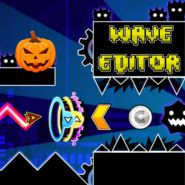




Geometry Dash Wave Editor is a creative level-building experience that lets players design and test custom Wave mode challenges inspired by Geometry Dash. Instead of simply completing levels, you'll create your own obstacle courses using narrow tunnels, spikes, portals, and intricate layouts before putting your flying skills to the test.
Whether you're building beginner-friendly practice maps or extreme Wave challenges, Geometry Dash Wave Editor gives you the freedom to create unique levels and improve your precision. Since you're already here, why not give other games a try, such as: Geometry Arrow
Your objective is to build custom Wave stages and successfully navigate your own creations.
Experiment with different layouts to create fun, balanced, or extremely difficult levels.
Build custom obstacle courses using a variety of objects and decorations.
Switch between editing and gameplay to see how your designs perform in real time.
Create levels specifically designed around the iconic Wave mechanic, requiring precise zigzag movement.
Design unique stages using:
Build everything from simple practice maps to incredibly challenging Wave courses that push players' skills to the limit.
Since you're already here, why not give other games a try, such as: Geometry Arrow 2
Make obstacles challenging while leaving enough space for skilled players to react.
Play your level after every major edit to ensure it feels smooth and fair.
Speed portals can create exciting gameplay, but avoid overwhelming players with too many sudden transitions.
Decorations and color effects make your level more enjoyable without distracting from gameplay.
Players enjoy:
Every new design is an opportunity to challenge yourself and other players. Experiment with different obstacle patterns, improve your layouts, and discover creative ways to make each level both fun and rewarding.
Geometry Dash Wave Editor combines the excitement of Wave gameplay with the creativity of custom level design. Featuring flexible editing tools, precision-based mechanics, and endless possibilities for experimentation, it is the perfect choice for players who want to create, share, and master their own Geometry Dash-inspired Wave challenges. Since you're already here, why not give other games a try, such as: Geometry Vibes